
Join the closed beta
For valuable feedback and app improvements, beta testers are needed — Google requires at least 12 active testers for 14 consecutive days before the app can launch publicly. This is a two-step process that takes less than a few minutes. Below are the instructions to complete both steps for a successful beta test.
Join the testers group
Tap below and sign in with the Google account you use on your Android phone, then tap Join group. Your email whitelists your participation and may be used to occasionally reach out about the beta — feedback surveys, new releases, and important app updates.
Important: after you join, come back to this page to complete Step 2. The page should still be open in another tab.
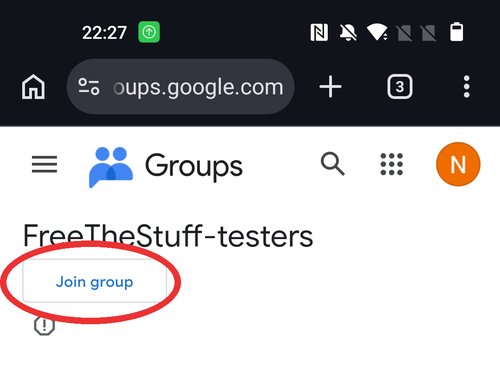
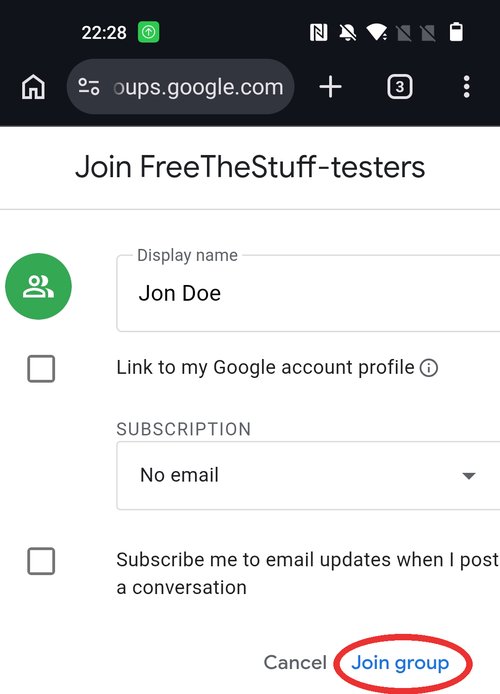
Don’t forget Step 2 below.
Wait about a minute after joining for Google to sync, then continue.
Install via Google Play
After joining the group, tap below to open the testing page. Tap Become a tester to accept, then tap the download it on Google Play link to install the app from the Play Store.
Install on Play Store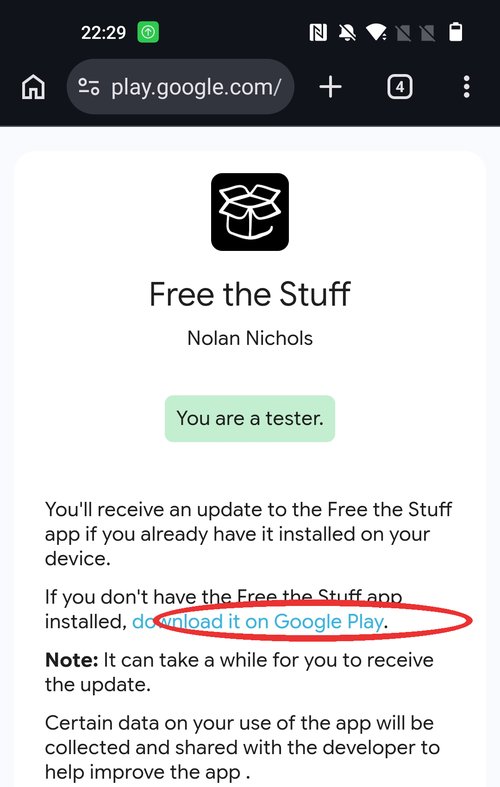
PS — thank you to everyone who has helped with current and future testing. I owe you all a coffee or beer :)